> For the complete documentation index, see [llms.txt](https://answeringservicecare.com/docs/llms.txt). Markdown versions of documentation pages are available by appending `.md` to page URLs; this page is available as [Markdown](https://answeringservicecare.com/docs/api-reference/api-clients/external-api-dispatching.md).
# External API Dispatching
Send data from Answering Service Care to external systems through HTTP-based workflows.
Use External API Dispatching when Answering Service Care needs to send data to another system.
This is useful for real-time routing, downstream automation, and client-specific workflow handoffs.
### What it is
External API Dispatching sends ASC data to an external HTTP endpoint as part of an operational workflow.
It fits cases where another platform needs to react to events created inside ASC.
Common examples:
* create or update a CRM record
* open a help desk ticket
* trigger an external scheduling or escalation workflow
### When to use it
Use External API Dispatching when ASC should push data outward.
Use Zapier when you want a low-code SaaS automation layer for non-sensitive data.
{% hint style="info" %}
External API Dispatching sends data directly from ASC to your own endpoint, with no third party in between, so it is the right choice for HIPAA-sensitive workflows that require secure delivery. (By contrast, Zapier routes data through a third-party service and should not be used for PHI.)
{% endhint %}
### Configure it in the Oncall Calendar
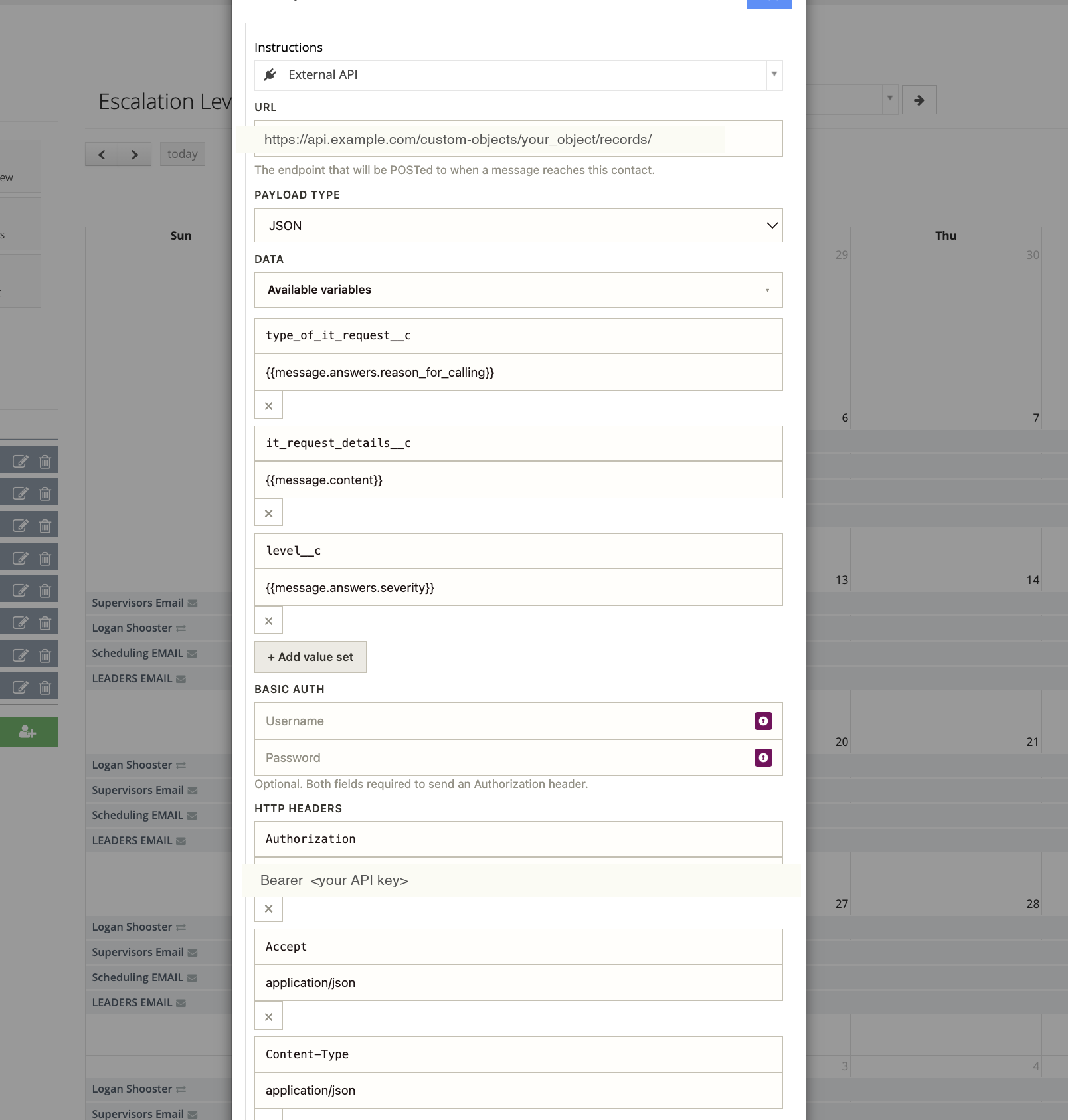
External API Dispatching is set up as an **External API delivery method** on an Oncall contact. When a message reaches that contact, ASC sends an HTTP `POST` to the endpoint you define.
The External API delivery method, with URL, payload, field mappings, and headers.
Open the contact's delivery methods, choose **External API**, and configure:
| Field | What it does |
| ---------------- | ------------------------------------------------------------------------------------------------------------------------------------------ |
| **URL** | The endpoint ASC `POST`s to when a message reaches this contact. Use HTTPS. |
| **Payload Type** | The request body format. `JSON` is recommended. |
| **Data** | One or more value sets that build the request body. For each, enter the field name the receiving system expects and the ASC value to send. |
| **Basic Auth** | Optional username and password. Both are required to send a Basic `Authorization` header. |
| **HTTP Headers** | Custom headers such as `Authorization`, `Accept`, and `Content-Type`, use these for a bearer token or API key. |
#### Map fields with merge variables
In each **Data** value set, the value can be a merge variable chosen from the **Available variables** list. Variables resolve against the message that triggered the dispatch:
| Field (receiving system) | Value (ASC variable) |
| ------------------------ | ---------------------------------------- |
| `type_of_request` | `{{message.answers.reason_for_calling}}` |
| `details` | `{{message.content}}` |
| `severity` | `{{message.answers.severity}}` |
`{{message.answers.}}` pulls a specific answer captured by your script, and `{{message.content}}` is the full message body. Select **Add value set** to map more fields.
{% hint style="info" %}
The complete list of variables is shown in the **Available variables** dropdown when you configure the delivery method.
{% endhint %}
#### Example request
With the configuration above, ASC sends a request like this (secrets shown redacted):
{% code title="POST to your endpoint" %}
```http
POST https://api.example.com/custom-objects/your_object/records/
Authorization: Bearer
Accept: application/json
Content-Type: application/json
```
{% endcode %}
```json
{
"type_of_request": "Billing question",
"details": "Caller wants a copy of last month's invoice.",
"severity": "Normal"
}
```
{% hint style="warning" %}
Never paste a real key into a screenshot or shared document. Store secrets only in the **HTTP Headers** or **Basic Auth** fields, and rotate any key that is ever exposed.
{% endhint %}
### What to prepare
Before you configure dispatching, define these items:
* the destination HTTPS endpoint
* the required authentication method
* the payload fields the receiving system expects
* the success criteria for the receiving system
Keep the destination contract stable.
That makes workflow changes easier to manage across clients and teams.
### Recommended endpoint design
Your external endpoint should:
* accept HTTPS requests
* validate authentication before processing data
* return a fast `2xx` response on success
If downstream work takes time, queue it after the request is accepted.
That reduces timeout risk in production workflows.
{% hint style="warning" %}
Treat every dispatched request as production traffic.
Validate auth, log requests, and avoid exposing sensitive data in error messages.
{% endhint %}
### Payload design guidance
Include identifiers that help the receiving system reconcile records cleanly.
Good payloads usually include:
* a stable ASC record ID
* account or client context
* timestamps and status values
Only send fields the target system needs.
That reduces mapping drift and support overhead.
### Common dispatch patterns
#### CRM and ticket routing
Dispatch message or task data to a CRM, PSA, or ticketing platform.
This helps keep client systems aligned with live answering activity.
#### Escalation workflows
Dispatch urgent events to an external on-call, field service, or alerting workflow.
This is useful when response rules live outside ASC.
#### Reporting and warehousing
Dispatch operational records into a reporting pipeline for analytics and reconciliation.
This works well when business reporting runs outside the platform.
### API alignment
If the receiving system also needs to call ASC, use the ASC API with the secure base URL:
```http
https://secure.answeringservicecare.com
```
Use these references when you define payloads and downstream actions:
* API Reference
* Messages
* Call Recordings
* To Dos
### Implementation checklist
Use this checklist before you go live:
1. confirm the destination URL and auth method
2. validate the payload with real sample data
3. log request and response results
4. test error handling with invalid data
5. confirm the receiving system handles duplicate requests safely
### Troubleshooting
If dispatching does not behave as expected, check:
* endpoint availability
* auth headers or tokens
* payload field names and formats
Also confirm the receiving system can process ASC identifiers exactly as sent.
That prevents broken links between records and follow-up actions.
---
# Agent Instructions
This documentation is published with GitBook. GitBook is the documentation platform designed so that both humans and AI agents can read, navigate, and reason over technical content effectively. Learn more at gitbook.com.
## Querying This Documentation
If you need additional information that is not directly available in this page, you can query the documentation dynamically by asking a question.
Perform an HTTP GET request on the current page URL with the `ask` query parameter, and the optional `goal` query parameter:
```
GET https://answeringservicecare.com/docs/api-reference/api-clients/external-api-dispatching.md?ask=&goal=
```
`ask` is the immediate question: it should be specific, self-contained, and written in natural language.
`goal` is optional and describes the broader end goal you are ultimately trying to accomplish on behalf of the user. GitBook uses it to tailor the answer towards what is most useful for that goal.
The response will contain a direct answer to the question and relevant excerpts and sources from the documentation.
Use this mechanism when the answer is not explicitly present in the current page, you need clarification or additional context, or you want to retrieve related documentation sections.