

A missed call doesn’t always stop at a missed conversation. For appointment-driven businesses, it can also mean lost revenue. A customer never reaches the calendar. A job goes to a competitor. An open time slot produces no revenue.
Scheduling technology solves part of that problem. It organizes availability and gives customers convenient ways to book. However, software alone cannot capture every opportunity.
Finding the best scheduling software for small business requires looking beyond basic calendar features. Businesses also need to consider how customers reach the scheduling system. Phone inquiries, after-hours calls, appointment questions, and complex requests all affect booking success.
Integrated scheduling connects those conversations directly with available appointments. Receptionists can qualify callers, check availability, and schedule appropriate appointments during the original interaction. Businesses can also automate certain routine bookings through AI answering. The result is a shorter path from customer interest to a confirmed appointment.
1. Find Where Scheduling Revenue Gets Lost
Most businesses can identify how many appointments fill their calendars. Fewer track how many potential appointments never reach them.
Revenue gaps often form before scheduling even starts. A prospect calls while employees help other customers. Someone contacts the business after hours. A caller leaves a voicemail, but contacts another provider before anyone returns the call. An existing customer needs to reschedule but cannot reach anyone, and eventually cancels.
Each situation separates customer demand from available capacity.
Online booking reduces some friction, but not every customer starts with a scheduling link. Many still want to speak with someone first. They might ask about pricing or explain their situation. Others need help choosing the correct service. Some simply want confirmation before committing to an appointment.
Businesses should examine where these inquiries break down:
- How many incoming calls do employees miss?
- How many callers wait for callbacks instead of receiving immediate scheduling help?
- How many appointment inquiries arrive outside regular hours?
- How long does the business take to return a scheduling request?
- How often do customers ask questions before booking?
- How many schedule changes leave an empty slot?
A scheduling strategy should account for these paths in the calendar. Providing callers with immediate booking support eliminates unnecessary delay. It also reduces the risk that an available appointment stays empty despite existing demand.
2. Choose Scheduling Software Around the Customer Journey
Scheduling needs vary widely between industries. A consultant arranging meetings needs a different workflow than an HVAC company dispatching technicians. A law firm screening potential clients needs something different again.
The best scheduling software for small business should align with how the company actually books appointments. It should also support the information employees need before and after scheduling.
Common platforms illustrate those differences:
Business Need | Software Examples | What Scheduling Involves |
|---|---|---|
General appointments | Calendly, Google Calendar, Microsoft Bookings | Meetings, availability, calendar coordination |
Business services | Zoho, Acuity Scheduling, HubSpot Meetings | Discovery calls, consultations, lead qualification, advisory sessions |
Legal | Clio, Lawmatics, MyCase | Intake, qualification, consultations, follow-ups |
Real Estate | ShowingTime+, AppFolio, Buildium | Property showings, leasing appointments, maintenance visits, prospect follow-up |
Home services | Jobber, Housecall Pro, ServiceTitan | Calls, jobs, technicians, dispatch |
Calendly supports booking pages, connected calendars, routing, reminders, payments, and integrations. Google Calendar also offers appointment schedules tied to calendar availability.
Other businesses need scheduling tools that connect with broader workflows. Consulting firms might tie appointments to lead qualification, discovery calls, and CRM records. Law firms can connect consultations with intake and prospective client information. Real estate teams might coordinate property showings, leasing appointments, maintenance visits, and prospect follow-up.
Home service companies face another challenge. Their scheduling systems often need to account for job type, technician availability, service area, and dispatch requirements.
Businesses should therefore ask more than, “Can customers book online?” They should consider what needs to happen before and after the appointment. The system should show accurate availability, distinguish between appointment types, and collect the right information before confirming the booking.
It should also send appointment details into the tools employees already use.
Integration matters because scheduling should support the complete customer journey. It should not operate as an isolated calendar.
3. Connect Calls Directly to Real-Time Scheduling
A scheduling integration creates more value when it removes delays from the booking process.
Consider a home service company that receives a call at 7:30 p.m. The caller needs service the next day. However, the customer first wants to confirm that the company can resolve the issue.
Without call coverage, the customer might leave a message or wait until morning. They might also contact another provider instead.
Integrated call handling creates a more direct workflow:
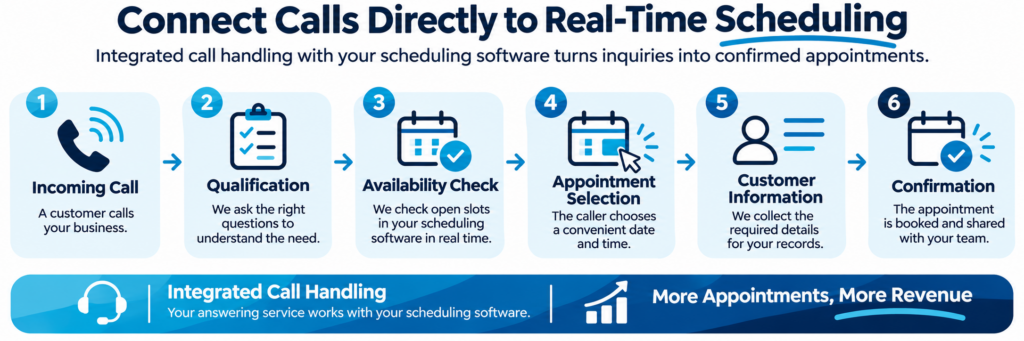
A receptionist can identify the reason for the call and apply the company’s booking criteria. They can then check the approved appointment windows and reserve a suitable time.
The same integration can support AI answering for predictable requests. AI can check approved availability, collect basic information, and book routine appointments. It can also handle straightforward scheduling changes when the workflow allows them.
This creates room for a hybrid approach without forcing every caller through the same process. Routine requests can move through automated scheduling. Calls that require judgment, clarification, or escalation can move to a live person.
The underlying goal stays the same regardless of how the business handles the call.
A law firm can schedule consultations. A property manager can arrange showings. A home service company can book jobs.
Each business removes unnecessary handoffs between the initial inquiry and its calendar. That gives the customer fewer opportunities to abandon the process before confirming an appointment.
4. Handle Scheduling Requests Software Cannot Resolve Alone
Self-service scheduling works best when customers already know exactly what they need. Real conversations often begin with uncertainty.
A caller might ask which appointment type fits the situation. A tenant might report a maintenance issue without knowing its urgency. A prospective legal client may need to be screened before a consultation is scheduled.
A homeowner could face the same problem. The business might need additional details before choosing a technician or appointment window.
These situations require context before scheduling.
Receptionists can gather that information in accordance with established business rules. Depending on the company, the conversation could cover:
- Service type
- Customer or prospect status
- Location or service area
Appointment urgency - Required employee or department
- Preferred date and time
- Basic intake information
- Escalation criteria
Those details help determine what should happen next.
A straightforward request might lead directly to an open appointment. An urgent situation could require escalation. Another caller might need a different service or department before anyone schedules a visit.
The scheduling system still plays an important role. It provides available times, appointment categories, staff calendars, and other booking information.
However, the conversation supplies the context needed to use that information correctly.
That distinction matters in industries with complicated scheduling rules. The goal is not simply to place an appointment on the calendar. The business needs to make the right appointment with the right information at the right time slot.
5. Measure Scheduling From the First Call to Revenue
Appointment volume alone does not show whether a scheduling strategy works.
A business could fill its calendar while still losing valuable calls. It could also respond slowly after hours. Some qualified callers might never become appointments.
Businesses need to measure the complete path from inquiry to completed service.
Useful metrics include:
- Total scheduling-related calls
- Percentage of calls answered
- Qualified appointment opportunities
- Call-to-booking conversion rate
- After-hours appointments booked
- Average time from inquiry to confirmation
- Rescheduling success rate
- Cancellation recovery rate
- Appointment show rate
- Revenue from phone-originated appointments
One useful starting point is:
Call-to-booking rate = booked appointments ÷ qualified scheduling calls
Consider a home service company with 100 qualified scheduling calls each month. If 70 become jobs, its call-to-booking rate reaches 70%.
The company can then examine those 70 jobs more closely. Perhaps 20 originated from calls outside regular business hours. That figure shows how much demand extended coverage added to the schedule.
Businesses can also identify where prospects drop off in the process. A high volume of qualified calls with few bookings can expose a scheduling problem. Slow confirmation times can point to another gap.
Tracking these outcomes moves scheduling beyond administrative efficiency.
The data shows which calls generate appointments and where potential revenue disappears. Businesses can then improve the parts of the scheduling process that have the greatest effect on conversion.
Frequently Asked Questions
What is the best scheduling software for small business?
The right platform depends on your workflow. Options include Calendly, Google Calendar, Microsoft Bookings, Square Appointments, and Acuity. Legal, property management, and home service businesses often use specialized platforms.
What features should small businesses look for in scheduling software?
Look for real-time availability, calendar syncing, reminders, intake options, integrations, and support for multiple appointment types. The right features depend on how your business books and manages appointments.
How can scheduling software help reduce lost revenue?
Scheduling software can reduce booking delays, missed opportunities, and empty appointment slots. Integrating it with call handling also helps businesses capture customers who prefer to book by phone.
Turn More Scheduling Opportunities Into Revenue
Scheduling technology can keep calendars organized, but the opportunity begins before an appointment is added to the schedule. Customers still call with questions. They contact businesses after hours and request schedule changes. Some need guidance before they can book.
Connecting those conversations directly with scheduling software removes steps from the process. Receptionists can move qualified callers into available appointments instead of creating another callback. Automated workflows can also handle routine requests when appropriate.
That connection makes scheduling easier to measure. Businesses can track which calls become appointments and how quickly inquiries convert. They can also identify how much after-hours demand reaches the calendar.
When call handling and scheduling work together, businesses reduce unnecessary handoffs. They create a shorter path between customer interest and a confirmed appointment.
That process helps capture more of the demand the business already generates